> For the complete documentation index, see [llms.txt](https://docs.tgshop.io/llms.txt). Markdown versions of documentation pages are available by appending `.md` to page URLs; this page is available as [Markdown](https://docs.tgshop.io/uz/telegramda-dokon-ochish/bot-qanday-yaratiladi.md).
# Bot qanday yaratiladi?
Ushbu ko'rsatmada do'koningiz uchun bot yaratishni o'rganasiz
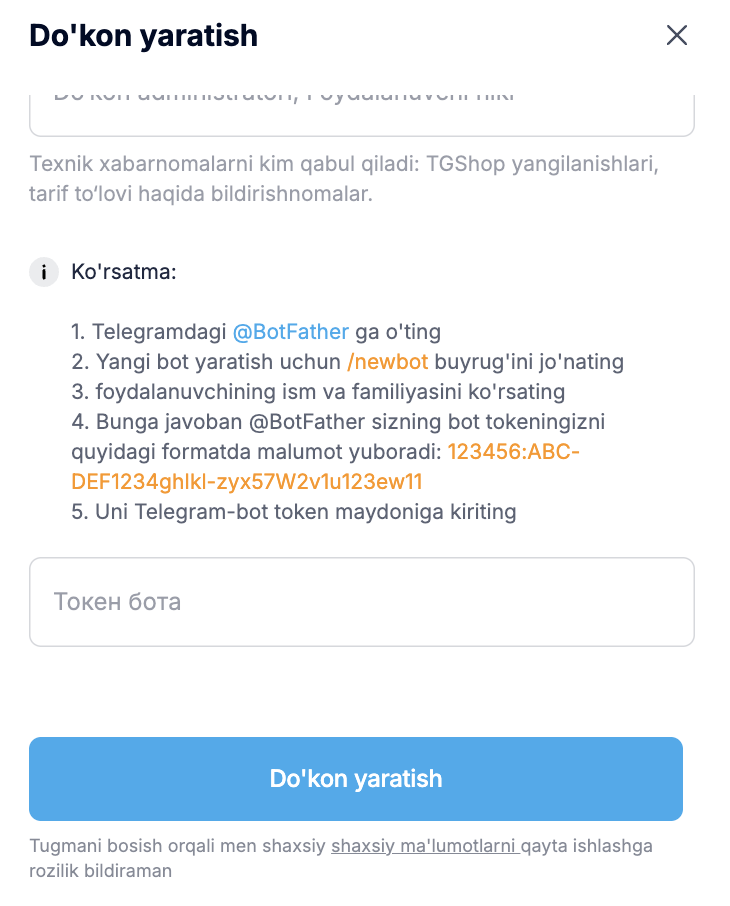
Telegram'da [@BotFather](https://t.me/BotFather) boti bilan chatga o'ting
Yangi bot yaratish uchun /newbot buyrug'ini yuboring
Botga name (nom) kiriting. Bu yerga do'koningiz yoki brendingiz nomini yozishingiz mumkin. Nom istalgan tilda bo'lishi mumkin (rus, ingliz yoki boshqa).
Botga username (nik) kiriting. Foydalanuvchi nomi faqat ingliz tilida bo‘lishi kerak va botusername\_bot formatiga mos kelishi zarur.
Bot username — bu yagona identifikator bo‘lib, u majburiy ravishda oxirida “bot” qo‘shimchasini o‘z ichiga oladi. U odatda pastki chiziq “\_” orqali yoki to‘g‘ridan-to‘g‘ri yoziladi.
{% hint style="warning" %}
Muhim: bot username (nik)ini bot yaratilgandan keyin o'zgartirib bo'lmaydi
{% endhint %}
@BotFather javobida bot tokenini quyidagi formatda yuboradi: 123456:ABC-DEF1234ghIki-zyx57W2v1u123ew11
Tokenni nusxalab oling va TGShop shaxsiy kabinetidagi “Telegram-bot tokeni” maydoniga joylashtiring.
---
# Agent Instructions
This documentation is published with GitBook. GitBook is the documentation platform designed so that both humans and AI agents can read, navigate, and reason over technical content effectively. Learn more at gitbook.com.
## Querying This Documentation
If you need additional information that is not directly available in this page, you can query the documentation dynamically by asking a question.
Perform an HTTP GET request on the current page URL with the `ask` query parameter, and the optional `goal` query parameter:
```
GET https://docs.tgshop.io/uz/telegramda-dokon-ochish/bot-qanday-yaratiladi.md?ask=&goal=
```
`ask` is the immediate question: it should be specific, self-contained, and written in natural language.
`goal` is optional and describes the broader end goal you are ultimately trying to accomplish on behalf of the user. GitBook uses it to tailor the answer towards what is most useful for that goal.
The response will contain a direct answer to the question and relevant excerpts and sources from the documentation.
Use this mechanism when the answer is not explicitly present in the current page, you need clarification or additional context, or you want to retrieve related documentation sections.
.jpeg?alt=media&token=754ff985-693e-49e4-a161-79e89e2c2878)
.jpeg?alt=media&token=039b4c27-e0e3-4738-bcf2-30f29e39aac8)
.jpeg?alt=media&token=8bd6c717-1bd4-42af-9eae-9fb09b87870e)