> For the complete documentation index, see [llms.txt](https://docs.tgshop.io/llms.txt). Markdown versions of documentation pages are available by appending `.md` to page URLs; this page is available as [Markdown](https://docs.tgshop.io/zapusk-magazina-v-max/kak-sozdat-bota-v-messendzhere-max.md).

# Как создать бота в мессенджере MAX?

В этой инструкции вы узнаете как создать бота в Max

Перед подключением бота к Max в TGShop, данного бота необходимо создать.

### Регистрация организации в Max

Если у вашей организации еще нет профиля в MAX, начните с регистрации и верификации. Без верификации вы не сможете создать бота и получить токен. [Регистрация организации в Max.](https://business.max.ru/self/?#/services)&#x20;

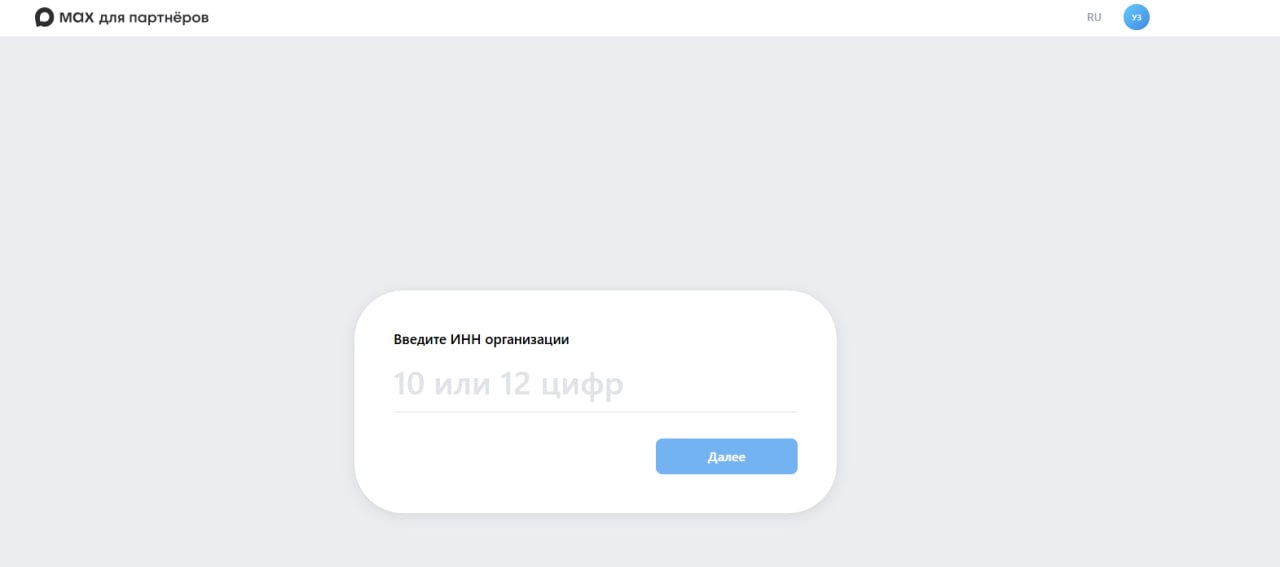
1. Откройте[ портал MAX](https://business.max.ru/self/?#/services) для организаций и выполните [вход](https://dev.max.ru/docs/maxbusiness/connection#%D0%AD%D1%82%D0%B0%D0%BF%202.%20%D0%92%D1%85%D0%BE%D0%B4%20%D0%B2%20%D0%BF%D1%80%D0%BE%D1%84%D0%B8%D0%BB%D1%8C%20%D0%BE%D1%80%D0%B3%D0%B0%D0%BD%D0%B8%D0%B7%D0%B0%D1%86%D0%B8%D0%B8).
2. [Создайте](https://dev.max.ru/docs/maxbusiness/connection#%D0%AD%D1%82%D0%B0%D0%BF%202.%20%D0%92%D1%85%D0%BE%D0%B4%20%D0%B2%20%D0%BF%D1%80%D0%BE%D1%84%D0%B8%D0%BB%D1%8C%20%D0%BE%D1%80%D0%B3%D0%B0%D0%BD%D0%B8%D0%B7%D0%B0%D1%86%D0%B8%D0%B8) профиль организации по ИНН.

<figure><img src="https://149468416-files.gitbook.io/~/files/v0/b/gitbook-x-prod.appspot.com/o/spaces%2FLo474ql7jgpwSAeS8WAS%2Fuploads%2FvDxPV3zTg98X49sRlX8T%2Fimage.jpeg?alt=media&amp;token=49533ed8-7adb-4d1f-9b32-8dbedde2dce8" alt=""><figcaption></figcaption></figure>

3. Пройдите верификацию организации по требованиям MAX и дождитесь подтверждения.

<figure><img src="https://149468416-files.gitbook.io/~/files/v0/b/gitbook-x-prod.appspot.com/o/spaces%2FLo474ql7jgpwSAeS8WAS%2Fuploads%2FjvK5eigCxG1hyu2ypa9q%2F%D0%A1%D0%BD%D0%B8%D0%BC%D0%BE%D0%BA%20%D1%8D%D0%BA%D1%80%D0%B0%D0%BD%D0%B0%202026-03-03%20%D0%B2%2015.08.44.png?alt=media&amp;token=7ef4467f-039e-45ff-b89a-8cd494800bb5" alt=""><figcaption></figcaption></figure>

### Создание бота Max и модерация&#x20;

1. Бот [создается](https://dev.max.ru/docs/chatbots/bots-create#%D0%AD%D1%82%D0%B0%D0%BF%201.%20%D0%A1%D0%BE%D0%B7%D0%B4%D0%B0%D0%BD%D0%B8%D0%B5%20%D1%87%D0%B0%D1%82-%D0%B1%D0%BE%D1%82%D0%B0) в личном кабинете MAX, после создания отправляется на модерацию.
2. В личном кабинете MAX откройте раздел Чат-бот и мини-приложение. Нажмите на кнопку "Создать" чтоб создать чат-бота.&#x20;
3. Нажмите "Создать" и заполните карточку бота.

{% hint style="info" %}
Ник не редактируется. Все поля для заполнения обязательны
{% endhint %}

<figure><img src="https://149468416-files.gitbook.io/~/files/v0/b/gitbook-x-prod.appspot.com/o/spaces%2FLo474ql7jgpwSAeS8WAS%2Fuploads%2FATJJtZWIbJqTwAJrqLvc%2Fimage%20(2).png?alt=media&amp;token=abda882f-09a1-459d-9504-3e5e4c519251" alt=""><figcaption></figcaption></figure>

4. Отправьте бота на [модерацию](https://dev.max.ru/docs/chatbots/bots-create#%D0%AD%D1%82%D0%B0%D0%BF%202.%20%D0%9C%D0%BE%D0%B4%D0%B5%D1%80%D0%B0%D1%86%D0%B8%D1%8F) и дождитесь статуса, что бот одобрен. Обычно проверка занимает до 24 часов.

Одобренный бот:

<div align="left"><figure><img src="https://149468416-files.gitbook.io/~/files/v0/b/gitbook-x-prod.appspot.com/o/spaces%2FLo474ql7jgpwSAeS8WAS%2Fuploads%2Fb85Uww3exGpJnC8fPcC8%2F%D0%A1%D0%BD%D0%B8%D0%BC%D0%BE%D0%BA%20%D1%8D%D0%BA%D1%80%D0%B0%D0%BD%D0%B0%202026-03-03%20%D0%B2%2015.20.53.png?alt=media&amp;token=18821080-3c95-4b5d-ae29-9d7c2c2da282" alt="" width="80"><figcaption></figcaption></figure></div>

5. Если MAX вернул замечания, внесите правки и повторно отправьте бота на модерацию.

### Получение токена бота&#x20;

1. Откройте карточку вашего бота в личном кабинете MAX. Нажмите "Получить токен" в разделе "Интеграция" и скопируйте токен бота в открывшейся форме.

{% hint style="info" %}
Токен доступен после прохождения модерации. Он нужен для подключения бота в TGShop.&#x20;
{% endhint %}

{% hint style="info" %}
Ограничение по использованию токена. Токен бота может быть использован **только в одном сервисе** — в последнем подключённом.

Например, нельзя одновременно подключить MAX-бота напрямую к Битрикс24 и параллельно к TGShop.&#x20;
{% endhint %}

<figure><img src="https://149468416-files.gitbook.io/~/files/v0/b/gitbook-x-prod.appspot.com/o/spaces%2FLo474ql7jgpwSAeS8WAS%2Fuploads%2F4xClgoxOyxJYbfOudFIY%2F%D0%A1%D0%BD%D0%B8%D0%BC%D0%BE%D0%BA%20%D1%8D%D0%BA%D1%80%D0%B0%D0%BD%D0%B0%202026-03-03%20%D0%B2%2015.23.06.png?alt=media&amp;token=51fedc0d-a6cb-46e6-9192-dcb949e42325" alt=""><figcaption></figcaption></figure>

<figure><img src="https://149468416-files.gitbook.io/~/files/v0/b/gitbook-x-prod.appspot.com/o/spaces%2FLo474ql7jgpwSAeS8WAS%2Fuploads%2FfHgx2N2j8OjTLQScOx3D%2F%D0%A1%D0%BD%D0%B8%D0%BC%D0%BE%D0%BA%20%D1%8D%D0%BA%D1%80%D0%B0%D0%BD%D0%B0%202026-03-03%20%D0%B2%2015.24.12.png?alt=media&amp;token=4c0f92a7-9a5b-4988-97f1-b72ae207e144" alt=""><figcaption></figcaption></figure>


---

# Agent Instructions
This documentation is published with GitBook. GitBook is the documentation platform designed so that both humans and AI agents can read, navigate, and reason over technical content effectively. Learn more at gitbook.com.

## Querying This Documentation
If you need additional information that is not directly available in this page, you can query the documentation by asking a question.

Perform an HTTP GET request on the following URL with the `ask` and `goal` query parameters:

```
GET https://docs.tgshop.io/zapusk-magazina-v-max/kak-sozdat-bota-v-messendzhere-max.md?ask=<question>&goal=<user_goal>
```

`ask` is the immediate question: it should be specific, self-contained, and written in natural language.
`goal` is what the user is ultimately trying to achieve, the reason they need the answer. Sharing it helps GitBook give you a better, more relevant answer. A goal is most helpful when it describes the outcome the user wants rather than restating the question. For example, with `ask=how do I create an API token`, a goal like `automate deployments from our CI pipeline` lets GitBook tailor the answer to that use case.

The response will contain a direct answer to the question and relevant excerpts and sources from the documentation.

Use this mechanism when the answer is not explicitly present in the current page, you need clarification or additional context, or you want to retrieve related documentation sections.